Best Google Shopping Plugins for WooCommerce Compared (2026)
Compare the top Google Shopping and product feed plugins for WooCommerce. Features, pricing, pros and cons of each option including Google's official plugin.

Choosing the right Google Shopping plugin for WooCommerce can be confusing. There are dozens of options with different features, pricing, and limitations. This guide compares the top plugins to help you make an informed decision.
Two Types of Solutions
Before comparing plugins, understand there are two fundamentally different approaches:
1. API-Based (Direct Sync)
- Google for WooCommerce (official plugin)
- Syncs products directly to Google Merchant Center via API
- Requires WordPress.com/Jetpack connection
- No feed file to manage
2. Feed File-Based
- All other plugins (AdTribes, CTX Feed, WooPlugin, etc.)
- Generates XML/CSV feed file
- You upload the feed URL to Google Merchant Center
- Full control, works anywhere, no external connections
Most stores prefer feed-based plugins for more control and multi-channel support.
Quick Comparison
| Plugin | Type | GTIN Free? | Multi-Channel | Price |
|---|---|---|---|---|
| Google for WooCommerce | API sync | No fields | Google only | Free |
| Product Feed PRO (AdTribes) | Feed file | No | 100+ channels | €99/yr |
| CTX Feed | Feed file | Yes | 130+ channels | $119/yr |
| WooPlugin | Feed file | Yes | 6 channels (Pro) | $79/yr |
| Product Feed Manager | Feed file | No | 180+ channels | $79/yr |
| WebToffee Product Feed | Feed file | Yes | Multiple | $89/yr |
Google for WooCommerce (Official Plugin)
The official solution from WooCommerce & Google.
Google for WooCommerce is the native integration recommended during WooCommerce setup. It connects your store directly to Google Merchant Center via API.
What It Does
- Direct API sync to Google Merchant Center
- Run Google Ads campaigns from WooCommerce
- Free product listings on Google Shopping
- Performance Max campaign integration
Pros
- Official integration (Google + WooCommerce)
- No feed file to manage
- Built-in Google Ads campaign management
- Free to use
Cons
- Requires WordPress.com/Jetpack connection - your store connects to external services
- No GTIN/Brand/MPN fields - you still need another plugin for product identifiers
- Google only - no Facebook, Pinterest, TikTok support
- Known sync issues - users report stale data, images not updating
- Limited feed control - can’t inspect or customize the feed
- Multi-currency limitations - only syncs primary store currency
Common Problems Reported
From WordPress.org support forums and GitHub issues:
- Products not syncing after changes
- Stale images and prices in Google
- Dashboard showing incorrect product counts
- Shipping information errors
- Connection issues requiring reconnection
Best For
Stores that want direct Google integration and don’t mind:
- Connecting to WordPress.com/Jetpack services
- Using a separate plugin for GTIN fields
- Google-only (no other channels)
Verdict
Good for basic Google Shopping if you’re already in the Jetpack ecosystem. But you’ll likely still need a feed plugin for GTIN fields and multi-channel support. Many stores use both.
Feed-Based Plugins Comparison
1. Product Feed PRO by AdTribes
The market leader with 100,000+ installs.
AdTribes is the most popular product feed plugin. It offers extensive features and supports over 100 marketing channels.
Pros
- Mature, well-tested codebase
- 100+ pre-configured templates
- Excellent documentation
- Active development
Cons
- GTIN fields require Pro (€99/year)
- Interface can be overwhelming
- Slower support response times
- Expensive for basic needs
Pricing
| Plan | Price | Sites |
|---|---|---|
| Growth | €99/year | 1 |
| Plus | €179/year | 3 |
| Business | €199/year | Unlimited |
Best For
Large stores needing advanced features and multiple channel support.
Verdict
Great plugin, but expensive if you just need GTIN fields. The free version is powerful but missing the most essential feature for Google Shopping approval.
2. CTX Feed by WebAppick
Feature-rich with a generous free tier.
CTX Feed is the second most popular option, known for its extensive template library and good free version.
Pros
- GTIN fields included free
- 130+ pre-built templates
- Good documentation
- Regular updates
Cons
- Complex interface
- Steep learning curve
- Some features hard to find
- Higher price than alternatives
- Reported issues with bugs, WPML compatibility, and support response times
Pricing
| Plan | Price | Sites |
|---|---|---|
| Single | $119/year | 1 |
| Popular | $199/year | 5 |
| Developer | $229/year | Unlimited |
Best For
Power users who need advanced customization and don’t mind complexity.
Verdict
Solid choice with free GTIN fields. The complexity might be overkill for stores that just need basic Google Shopping feeds.
3. Google Shopping for WooCommerce (WooPlugin)
Simple, focused, and generous free tier.
A focused solution that prioritizes simplicity and free GTIN fields.
Pros
- GTIN, Brand, MPN fields completely free
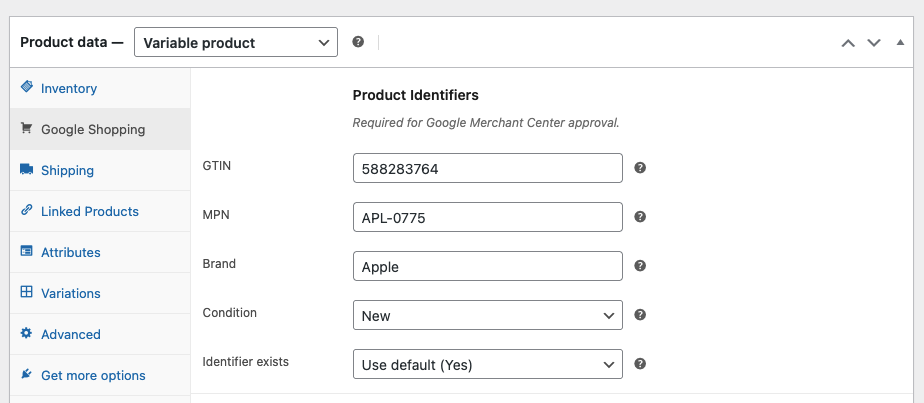 WooPlugin adds GTIN, Brand, and MPN fields for free
- Unlimited products in free tier
- Simple, focused interface
- Lower Pro price ($79/year)
- No external connections required - fully self-hosted
- Feed file you can inspect and debug
Cons
- Newer plugin (less proven)
- Fewer templates than competitors (focused on major platforms)
Pricing
| Plan | Price | Sites |
|---|---|---|
| Free | $0 | Unlimited |
| Pro | $79/year | 1 |
| Agency | $299/year | Unlimited |
Free vs Pro
| Feature | Free | Pro |
|---|---|---|
| Products | Unlimited | Unlimited |
| GTIN/Brand/MPN | Yes | Yes |
| Google Feed | Yes | Yes |
| Feed Generation | Manual | Automatic |
| Scheduled Updates | No | Yes |
| Update on Save | No | Yes |
| Facebook/Meta Feed | No | Yes |
| Pinterest Feed | No | Yes |
| TikTok Feed | No | Yes |
| Bing Feed | No | Yes |
| Snapchat Feed | No | Yes |
Best For
Stores that want GTIN fields without paying, value simplicity, and prefer self-hosted solutions without external connections.
Verdict
Best value for Google Shopping. Free GTIN fields and unlimited products set it apart. Pro adds multi-channel feeds at a competitive price.
4. Product Feed Manager by RexTheme
Budget-friendly Pro, but limited free tier.
Product Feed Manager offers a lower Pro price but has a restrictive free version.
Pros
- Lower Pro price ($79/year)
- 200+ merchant templates
- Google auto-sync feature
- Good for small stores
Cons
- Free limited to 200 products
- GTIN fields require Pro
- Less active development
- Fewer integrations
Pricing
| Plan | Price | Sites |
|---|---|---|
| Single | $79/year | 1 |
Best For
Small stores under 200 products who can live without GTIN fields, or those willing to pay $79/year.
Verdict
The 200 product limit on the free tier is frustrating when competitors offer unlimited. Only makes sense if you’re definitely buying Pro.
5. WebToffee WooCommerce Product Feed
Solid all-rounder with good free tier.
WebToffee offers a balanced approach with useful free features and reasonable pricing.
Pros
- GTIN fields free
- Unlimited products free
- Easy setup wizard
- Good documentation
Cons
- Smaller user base
- Less community support
- Fewer templates than leaders
Pricing
| Plan | Price | Sites |
|---|---|---|
| Single | $89/year | 1 |
| Business | $199/year | 5 |
| Agency | $399/year | 25 |
Best For
Stores wanting a middle-ground option with free GTIN fields and good features.
Verdict
Good alternative to CTX Feed with similar free features but simpler interface. Worth considering if CTX Feed feels too complex.
Feature Comparison Matrix
| Feature | Google for WC | AdTribes | CTX Feed | WooPlugin | RexTheme | WebToffee |
|---|---|---|---|---|---|---|
| Approach | API sync | Feed file | Feed file | Feed file | Feed file | Feed file |
| Free Tier | ||||||
| Unlimited Products | ✅ | ✅ | ✅ | ✅ | ❌ (200) | ✅ |
| GTIN/Brand/MPN | ❌ | ❌ | ✅ | ✅ | ❌ | ✅ |
| Google Feed | ✅ | ✅ | ✅ | ✅ | ✅ | ✅ |
| No External Connection | ❌ | ✅ | ✅ | ✅ | ✅ | ✅ |
| Pro/Paid Features | ||||||
| Facebook Feed | ❌ | ✅ | ✅ | ✅ | ✅ | ✅ |
| Pinterest/TikTok | ❌ | ✅ | ✅ | ✅ | ✅ | ✅ |
| Multi-language | ❌ | ✅ | ✅ | Coming | ✅ | ✅ |
| Google Ads Integration | ✅ | ❌ | ❌ | ❌ | ❌ | ❌ |
| Pricing | ||||||
| Entry Pro | Free | €99 | $119 | $79 | $79 | $89 |
Pricing Comparison
| Plugin | 1 Site | 3-5 Sites | Unlimited |
|---|---|---|---|
| Google for WooCommerce | Free | Free | Free |
| AdTribes | €99 (~$108) | €179 (~$195) | €199 (~$217) |
| CTX Feed | $119 | $199 | $229 |
| WooPlugin | $79 | - | $299 |
| RexTheme | $79 | - | - |
| WebToffee | $89 | $199 | $399 |
Which Plugin Should You Choose?
Choose Google for WooCommerce if:
- You want official Google integration
- You’re already using Jetpack/WordPress.com
- You only need Google Shopping (no other channels)
- You’ll use a separate plugin for GTIN fields
- You want to run Google Ads from WooCommerce
Choose AdTribes if:
- You need 100+ channel templates
- You have budget for €99+/year
- You want the most established option
- You need advanced filtering and rules
Choose CTX Feed if:
- You want free GTIN fields with advanced features
- You’re comfortable with complex interfaces
- You need extensive customization options
Choose WooPlugin if:
- You want GTIN fields free
- You prefer simplicity over features
- You want no external connections (self-hosted)
- You need multi-channel at an affordable price ($79/year)
- You want a feed file you can inspect and control
Choose Product Feed Manager if:
- You have under 200 products AND don’t need GTIN
- You want the cheapest Pro option
- You need basic Google auto-sync
Choose WebToffee if:
- You want free GTIN with simpler interface than CTX
- You need a balanced all-around option
- CTX Feed feels too complex
Our Recommendation
For most WooCommerce stores, we recommend Google Shopping for WooCommerce (WooPlugin) for these reasons:
- Free GTIN fields - Essential for Google Shopping approval, free from day one
- Unlimited products - No artificial limits
- Self-hosted - No WordPress.com/Jetpack connection required
- Simple interface - Focus on what matters, not 100+ templates you’ll never use
- Affordable Pro - $79/year for automation + multi-channel feeds
If you want direct Google integration and don’t mind the Jetpack connection, Google for WooCommerce is a decent free option - but you’ll still need a plugin for GTIN fields.
If you need advanced features like multi-language support or 100+ channel templates, CTX Feed or AdTribes are better choices - but you’ll pay more.
FAQ
Q: Do I really need GTIN fields?
For most products, yes. Google strongly prefers products with GTINs, and many categories require them. Products without GTINs may not appear in Shopping results or may be disapproved.
Q: Can I use Google for WooCommerce AND a feed plugin?
Yes, many stores do. Use Google for WooCommerce for direct sync and Google Ads, and use a feed plugin (like WooPlugin) for GTIN fields and multi-channel feeds (Facebook, Pinterest, etc.).
Q: What’s the difference between API sync and feed files?
- API sync (Google for WooCommerce): Products sync directly to Google via API. Less control, but automatic.
- Feed file (all others): Plugin generates an XML file, you give Google the URL. More control, inspectable, works with any platform.
Q: Is the free version enough?
For most small stores, yes. If you have under 50 products and don’t update them frequently, manual feed generation works fine. Once you’re updating products daily, automatic updates become valuable.
Q: Can I switch plugins later?
Yes, but it requires re-entering product data. GTIN, Brand, and MPN fields are stored differently by each plugin. Start with the right plugin to avoid migration hassle.
Q: Which is best for Facebook/Instagram?
AdTribes, CTX Feed, and WooPlugin Pro all offer Facebook/Meta catalog feeds. WooPlugin Pro also includes Pinterest, TikTok, Bing, and Snapchat feeds. Google for WooCommerce does NOT support Facebook.
Q: Why would I choose a feed plugin over Google’s official plugin?
- GTIN fields - Google for WooCommerce doesn’t add GTIN/Brand/MPN fields
- Multi-channel - Feed plugins support Facebook, Pinterest, TikTok, etc.
- Privacy - No external WordPress.com/Jetpack connection required
- Control - You can inspect and customize the feed file
- Reliability - Feed files don’t have the sync issues reported with the API approach
Ready to get started? Try Google Shopping for WooCommerce - free GTIN fields, unlimited products, no external connections required.
Ready to sell on Google Shopping?
Get our free plugin with GTIN, Brand, and MPN fields. No product limits, no paywalls for essential features.